When someone creates a pull request from their fork, they usually decide whether other people can commit to the pull request's compare branch. For greater collaboration, the author can give maintainers of the upstream repository—that is, anyone with push access to the upstream repository—permission to commit to the compare branch. See Gabeln.
Pull request authors can set these permissions when they create a pull request from a fork in a personal account. They can also update an existing pull request to let repository maintainers commit to the branch. See Creating a pull request from a fork.
Enabling repository maintainer permissions on existing pull requests
-
On GitHub, navigate to the main page of the upstream repository of your pull request.
-
Under the upstream repository name, click Pull requests.

-
In the list of pull requests, navigate to the pull request that you'd like to allow commits on.
-
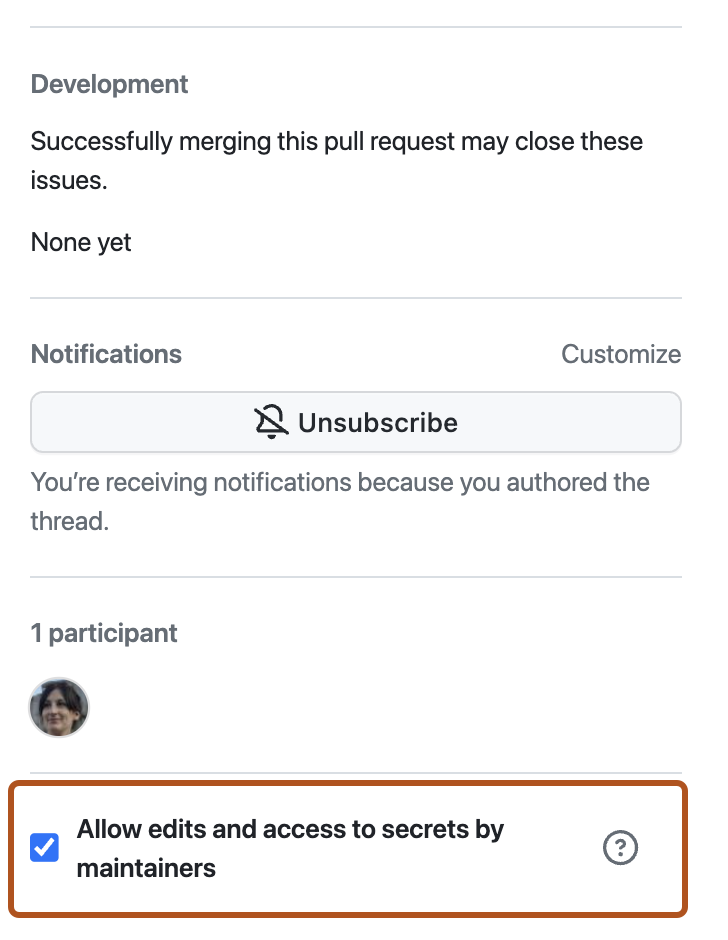
Wenn du bei benutzereigenen Forks allen Personen mit Pushzugriff auf das Upstreamrepository erlauben möchtest, Änderungen an deinem Pull Request vorzunehmen, wähle Bearbeitungen von Maintainern zulassen aus.
Warnung
Wenn dein Fork GitHub Actions-Workflows enthält, lautet die Option Allow edits and access to secrets by maintainers. Wenn du die Bearbeitung des Branches eines Forks zulässt, der GitHub Actions-Workflows enthält, kann ein Maintainer auch die Workflows des geforkten Repositorys bearbeiten, wodurch möglicherweise Werte von Geheimnissen preisgegeben werden und Zugriff auf andere Branches gewährt wird.